2025년 10월 14일 화요일

UE5 - Multi Key Action (Chorded Action)


Create IA(input actions) for Ctrl and Z, then map them in the IMC. After mapping Ctrl, configure its Key Setting and add a Trigger. Set the Trigger to use a Chorded Action, and assign the chorded action to the Z IA(input action). Finally, configure the Key Setting for the Z IA(input action) to complete the setup.


2024년 6월 19일 수요일

UE4 - Can’t Attach to Socket after Mesh Merge - packaged builds only


Mesh MergeBone은 가져올 수 있지만 Socket은 아마도 잃어버린것 같습니다.


-Solution-

MergeMesh->RebuildSocketMap();

“ return MergeMesh; ” 바로 위에 붙여야합니다.

2024년 1월 12일 금요일

UE4 - How to Receive Input Actor(no Character) & Input Priority


 How to Receive Input Actor?


Actor Class Default


Select the player to be entered into the Auto Receive Input


Input Priority - Input Order Setting

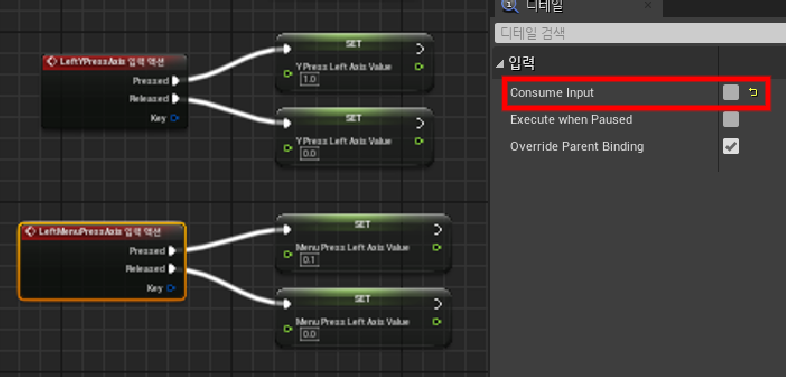
UE4 - to receive input to two actors at the same time


If true "Consume Input" 
If you run on a high-priority actor, the low-priority actor will not receive this input.


2023년 12월 19일 화요일

UE4 - Runtime Change Gamemode in bp


?Game=GameModeReferencePath_C

You can get the asset path by right-clicking on your Game Mode asset in the Content Browser, and selecting the Copy Reference option. What we need is basically the part within the single quotation marks. For example, this is what I get upon using Copy Reference:
Blueprint'/Game/TowerDefenseStarterKit/Blueprints/GameModes/BP_GameMode_TowerDefense.BP_GameMode_TowerDefense'

So my reference path is:
/Game/TowerDefenseStarterKit/Blueprints/GameModes/BP_GameMode_TowerDefense.BP_GameMode_TowerDefense

With the path obtained, the final string command for this example scenario will be as shown below:
?Game=/Game/TowerDefenseStarterKit/Blueprints/GameModes/BP_GameMode_TowerDefense.BP_GameMode_TowerDefense_C


번역 :


?게임 = GameModeReferencePath_C

당신은 할 수 있습니다 컨텐츠 브라우저에서 게임 모드 자산을 마우스 오른쪽 단추로 클릭하고 참조 복사 옵션을 선택하여 자산 경로를 얻습니다.. 우리에게 필요한 것은 기본적으로 단일 인용 부호 내의 부분입니다. 예를 들어, 이것이 Copy Reference를 사용하여 얻는 것입니다:
Blueprint '/Game/TowerDefenseStarterKit / Blueprints / GameModes / BP_GameMode_TowerDefense.BP_GameMode_TowerDefense'

내 참조 경로는 다음과 같습니다:
/Game / TowerDefenseStarterKit / Blueprints / GameModes / BP_GameMode_TowerDefense.BP_GameMode_TowerDefense

얻은 경로를 통해이 예제 시나리오의 최종 문자열 명령은 다음과 같습니다:
?Game = /Game/TowerDefenseStarterKit/Blueprints/GameModes/ BP_GameMode_TowerDefense.BP_GameMode_TowerDefense_C

마지막에 "_C" 붙이는게 중요!!!!

“ _C ”은 BlueprintGeneratedClass의 내부 이름을 만들기 위해 청사진 이름에 추가 된 접두사입니다. 

2023년 2월 14일 화요일

2023년 2월 9일 목요일

UE4 - AISense_Sight not work on non-moving targets


    Auto Success Range from Last Seen Location - 값 변경
    ( Value >= 0 이면 움직이지 않으면 not work Perception )


2023년 1월 12일 목요일

UE4 - Mesh Relative Location Not Replication


CharacterMovement->NetworkSmoothingMode = ENetworkSmoothingMode::Disabled;
로 변경하니 정상 작동 확인.

캡슐 구성 요소 자식에 대한 런타임 상대 위치 수정은 엔진 네트워크 스무딩에 의해 매 틱마다 재설정됩니다.

2021년 2월 26일 금요일

알고리즘(algorithm) - 완주하지 못한 선수


문제 설명

수많은 마라톤 선수들이 마라톤에 참여하였습니다. 단 한 명의 선수를 제외하고는 모든 선수가 마라톤을 완주하였습니다.

마라톤에 참여한 선수들의 이름이 담긴 배열 participant와 완주한 선수들의 이름이 담긴 배열 completion이 주어질 때, 완주하지 못한 선수의 이름을 return 하도록 solution 함수를 작성해주세요.

제한사항
  • 마라톤 경기에 참여한 선수의 수는 1명 이상 100,000명 이하입니다.
  • completion의 길이는 participant의 길이보다 1 작습니다.
  • 참가자의 이름은 1개 이상 20개 이하의 알파벳 소문자로 이루어져 있습니다.
  • 참가자 중에는 동명이인이 있을 수 있습니다.
입출력 예
participantcompletionreturn
[leokikieden][edenkiki]leo
[marinajosipanikolavinkofilipa][josipafilipamarinanikola]vinko
[mislavstankomislavana][stankoanamislav]mislav
입출력 예 설명

예제 #1
leo는 참여자 명단에는 있지만, 완주자 명단에는 없기 때문에 완주하지 못했습니다.

예제 #2
vinko는 참여자 명단에는 있지만, 완주자 명단에는 없기 때문에 완주하지 못했습니다.

예제 #3
mislav는 참여자 명단에는 두 명이 있지만, 완주자 명단에는 한 명밖에 없기 때문에 한명은 완주하지 못했습니다.

출처


code)


결론 - 정렬 후 비교하여 명단에 없는 사람 추출.

양방향에서 비교하면 빠를줄 알았으나.. fail...

효율성이 좋지 못해 다른방법을 더 찾아봐야할듯...


문제 출처 - 프로그래머스 :  https://programmers.co.kr/learn/courses/30/lessons/42576

2021년 2월 24일 수요일

알고리즘(algorithm) - K번째수


문제 설명

배열 array의 i번째 숫자부터 j번째 숫자까지 자르고 정렬했을 때, k번째에 있는 수를 구하려 합니다.

예를 들어 array가 [1, 5, 2, 6, 3, 7, 4], i = 2, j = 5, k = 3이라면

  1. array의 2번째부터 5번째까지 자르면 [5, 2, 6, 3]입니다.
  2. 1에서 나온 배열을 정렬하면 [2, 3, 5, 6]입니다.
  3. 2에서 나온 배열의 3번째 숫자는 5입니다.

배열 array, [i, j, k]를 원소로 가진 2차원 배열 commands가 매개변수로 주어질 때, commands의 모든 원소에 대해 앞서 설명한 연산을 적용했을 때 나온 결과를 배열에 담아 return 하도록 solution 함수를 작성해주세요.

제한사항
  • array의 길이는 1 이상 100 이하입니다.
  • array의 각 원소는 1 이상 100 이하입니다.
  • commands의 길이는 1 이상 50 이하입니다.
  • commands의 각 원소는 길이가 3입니다.
입출력 예
arraycommandsreturn
[1, 5, 2, 6, 3, 7, 4][[2, 5, 3], [4, 4, 1], [1, 7, 3]][5, 6, 3]
입출력 예 설명

[1, 5, 2, 6, 3, 7, 4]를 2번째부터 5번째까지 자른 후 정렬합니다. [2, 3, 5, 6]의 세 번째 숫자는 5입니다.
[1, 5, 2, 6, 3, 7, 4]를 4번째부터 4번째까지 자른 후 정렬합니다. [6]의 첫 번째 숫자는 6입니다.
[1, 5, 2, 6, 3, 7, 4]를 1번째부터 7번째까지 자릅니다. [1, 2, 3, 4, 5, 6, 7]의 세 번째 숫자는 3입니다.

출처


code)


결론 - 벡터와 정렬만 사용할줄 안다면 쉽게 해결되는 문제.


문제 출처 -프로그래머스 - https://programmers.co.kr/learn/courses/30/lessons/42748